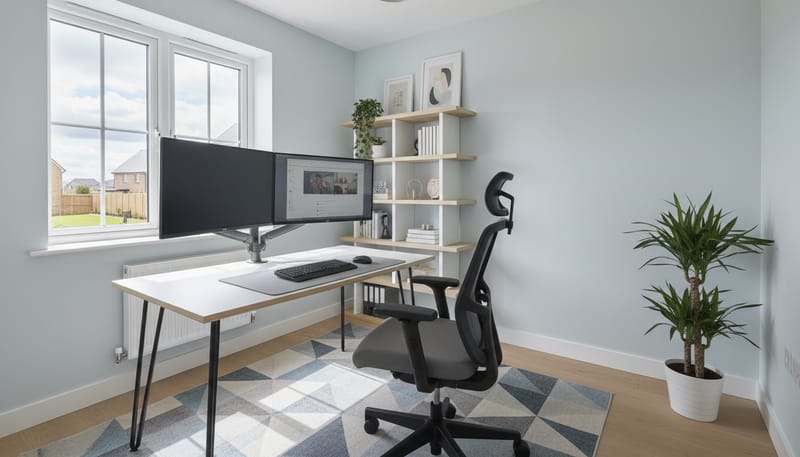
Choosing the Right Space in Your New Build
The first decision is where to locate your home office. The ideal setup is a dedicated room with a door that closes — this provides the separation between work and home life that is essential for productivity, focus, and mental wellbeing. Many new build homes offer a study, box room, or fourth bedroom that can be repurposed as a dedicated office. If a separate room is not available, there are effective alternatives that can work within the open-plan layouts common in modern new builds.
Best Options
- ✓ Dedicated study/office room — The gold standard. Complete separation, door that closes.
- ✓ Box room / spare bedroom — Even small rooms (2m x 2.5m) can house a functional office.
- ✓ Under-stairs alcove — Many new builds have usable space under the stairs for a compact desk setup.
- ✓ Garden office / pod — The ultimate WFH solution — a separate building in your garden.
Avoid If Possible
- ✗ Kitchen table — Constant disruption, no ergonomic setup, work bleeds into mealtimes.
- ✗ Bedroom — Blurs the boundary between work and sleep, harming both productivity and rest.
- ✗ Sofa — Terrible for posture, no screen separation, leads to back and neck problems.
- ✗ Busy hallway — High traffic area with constant interruptions and no privacy for calls.
When evaluating a space, consider natural light (a window is ideal for wellbeing and video calls), proximity to power sockets, broadband router distance (or the need for a WiFi extender), noise levels from the rest of the household, and whether the space can be kept at a comfortable temperature. New build homes with their efficient insulation and double glazing are generally excellent for home working, but south-facing rooms can overheat in summer without blinds or air conditioning.
Property Value Note: A well-designed home office adds value to your property. Rightmove data shows that homes marketed with a dedicated office or study sell for 3–5% more than equivalent properties without one. If you are converting a spare bedroom, consider this a value-adding improvement rather than an expense.
Essential Furniture: The Ergonomic Setup
If you are going to work from home regularly, investing in proper ergonomic furniture is not a luxury — it is a necessity. The Health and Safety Executive (HSE) reports that musculoskeletal disorders (including back pain, neck pain, and repetitive strain injuries) are the most common work-related health issue in the UK, affecting 470,000 workers annually. A properly set up workstation dramatically reduces the risk of these problems and improves your productivity and comfort.
The three non-negotiable items for any home office are: a good desk, a quality ergonomic chair, and a separate monitor (if you use a laptop). Everything else is a bonus. Below, we break down the options at three budget levels to help you find the right balance of quality and value.
Home Office Furniture: Budget Comparison
The standing desk revolution has transformed home offices. A sit-stand desk like the FlexiSpot E7 (£380–£430) or the IKEA BEKANT (£500) allows you to alternate between sitting and standing throughout the day, reducing the health risks associated with prolonged sitting. Studies published in the British Medical Journal show that standing for just 2–3 hours per day during working hours can improve energy levels, reduce back pain, and boost productivity by up to 15%.
Ergonomic Setup Guide: Position your monitor at arm’s length, with the top of the screen at or slightly below eye level. Your elbows should be at 90 degrees when typing, feet flat on the floor (or on a footrest), and lower back supported by the chair’s lumbar support. If using a laptop, always use a laptop stand (£15–£40) with a separate keyboard and mouse to achieve correct screen height. The HSE provides a free workstation self-assessment tool on their website.
Broadband and Connectivity
Reliable, fast broadband is the backbone of any home office. Most new build estates are connected to fibre broadband infrastructure, but the actual speeds available vary depending on whether your estate has full fibre to the premises (FTTP) or fibre to the cabinet (FTTC). FTTP delivers speeds of up to 1Gbps, while FTTC typically maxes out at 80Mbps. For home working involving video calls, large file transfers, and cloud-based applications, a minimum download speed of 30Mbps is recommended, with 100Mbps or more being ideal for multi-device households.
Broadband Options for New Build Home Workers
If your office is located far from the router, WiFi signal may be weak. A mesh WiFi system solves this by distributing strong, consistent coverage throughout your home. The TP-Link Deco X50 (3-pack, £170–£200), Google Nest WiFi Pro (£180–£220 for a 2-pack), and Amazon eero 6+ (£200–£250 for a 3-pack) are all excellent options for new build homes. Alternatively, for the most reliable connection, consider running an Ethernet cable from your router to your office using flat cable that can be concealed along skirting boards or under carpets — Cat 6 cable costs around £15–£30 for a 10–20m run from Screwfix or Amazon.
Lighting Your Home Office
Good lighting is crucial for productivity, eye health, and video call quality. Natural light is the gold standard — position your desk near a window, ideally facing the window or at 90 degrees to it (to avoid glare on your screen and backlighting on video calls). New build windows are typically large and well-placed, so take advantage of this. For artificial lighting, the standard new build ceiling pendant is usually insufficient for focused desk work. You will need a dedicated desk lamp at a minimum, and ideally a combination of ambient, task, and accent lighting.
Video Conferencing Setup
If your work involves regular video calls — and most remote roles now do — investing in a decent webcam, microphone, and background setup makes a significant difference to your professional presence. The built-in cameras and microphones on most laptops are adequate in a pinch, but dedicated peripherals offer dramatically better image and audio quality, which colleagues and clients will notice.
Webcams
Budget: Logitech C920 HD Pro (£60–£80) — The industry standard. Full HD 1080p, good low-light performance, built-in stereo mics.
Premium: Elgato Facecam (£140–£170) — Sony sensor, uncompressed video, no built-in mic (pair with a dedicated microphone). Professional quality for a fraction of studio camera cost.
Microphones & Headsets
Headset: Jabra Evolve2 65 (£150–£200) — Active noise cancellation, all-day comfort, excellent mic quality. The top choice for WFH professionals.
Desk Mic: Blue Yeti Nano (£70–£90) — USB plug-and-play, broadcast quality audio. Ideal for frequent presenters and podcast-style calls.
Garden Offices and Pods
For the ultimate home working experience, a garden office provides complete separation from the household, a dedicated professional environment, and can add significant value to your property. The UK garden office market has boomed since 2020, with a wide range of options from flat-pack self-build kits to fully insulated, electrically serviced pods that can be installed in a day.
Garden offices are generally permitted development in England (meaning no planning permission is required) provided they meet certain criteria: they must be single-storey, under 2.5m high if within 2m of a boundary, and not cover more than 50% of the garden area. However, if you live on a new build estate with restrictive covenants, you should check your deed and consult your management company before proceeding, as some estates restrict garden buildings.
Garden Office Options and Costs
Soundproofing and Noise Management
Working from home means dealing with household noise — children, pets, deliveries, neighbours, and the general sounds of domestic life. New build homes generally have better sound insulation than older properties, but internal walls (particularly stud partition walls) may allow more noise transfer than you would expect. If you work in a role that requires concentration or frequent calls, investing in some soundproofing measures can make a significant difference.
Soundproofing Solutions by Budget
Free – £50: Quick Fixes
Close the door (the simplest and most effective measure). Use a draught excluder under the door (£5–£10). Position your desk away from the noisiest wall. Use noise-cancelling headphones during calls. Play white noise or ambient sounds through a speaker to mask background noise.
£50 – £300: Soft Furnishing Solutions
Add a thick rug to the floor (£50–£150). Hang heavy curtains or a curtain room divider (£30–£80). Install acoustic foam panels on the wall behind your desk (£20–£50 for a pack of 12). Add a bookshelf filled with books against a shared wall — mass absorbs sound.
£300+: Structural Solutions
Upgrade the door to a solid-core internal door (£100–£250 plus fitting). Add acoustic plasterboard to shared walls (£20–£30 per sheet). Install a secondary glazing panel for external noise (£150–£400 per window). These are more invasive but highly effective.
Tax Relief and Financial Benefits
If you work from home regularly, you may be entitled to tax relief from HMRC to cover the additional costs of running your home as a workplace. Understanding what you can claim ensures you are not leaving money on the table.
Employed Workers (PAYE)
If your employer requires you to work from home (not by choice), you can claim tax relief of £6 per week (£312 per year) without needing to provide evidence of costs. For a basic-rate taxpayer, this is worth £62.40 per year; for a higher-rate taxpayer, £124.80.
Claim via HMRC’s online portal or through a Self Assessment tax return.
Self-Employed Workers
Self-employed workers can claim a proportion of household costs (heating, electricity, broadband, Council Tax, mortgage interest or rent) as a business expense. HMRC offers a flat rate of £10–£26 per month depending on hours worked, or you can calculate the actual proportion used for business.
Claim through your annual Self Assessment tax return.
Capital Gains Warning: If you use a room exclusively for business (rather than also using it as a bedroom, guest room, or family space), you may face a Capital Gains Tax liability when you sell your home. The “principal private residence” relief that normally exempts your home from CGT does not apply to the portion of the property used exclusively for business. To avoid this, ensure your office room also has a non-business use (such as a guest bed or family computer). Consult a tax adviser if you are unsure.
Productivity Tips for Home Workers
Having the right physical setup is only half the battle. Maintaining productivity, focus, and work-life balance when working from home requires discipline, routine, and self-awareness. Here are evidence-based strategies that successful home workers use to stay productive and avoid burnout.
Top 10 Productivity Strategies for Home Workers
- ✓ Start at the same time every day — Routine signals to your brain that it is time to work
- ✓ Get dressed for work — Even casual clothes; pyjamas signal relaxation, not productivity
- ✓ Use the Pomodoro Technique — 25 minutes focused work, 5 minutes break, repeat
- ✓ Take a proper lunch break — Away from your desk, ideally outside or in a different room
- ✓ Create a “commute” ritual — A walk before and after work mentally separates work and home
- ✓ Set boundaries with household members — Closed door means do not disturb
- ✓ Batch similar tasks together — Emails in blocks, calls in blocks, deep work in blocks
- ✓ Use focus apps — Forest, Freedom, or Cold Turkey to block distracting websites
- ✓ Shut down at a fixed time — Close the laptop, leave the room, and resist checking email
- ✓ Stay socially connected — Schedule virtual coffee chats with colleagues to combat isolation
Health and Wellbeing When Working From Home
Remote working can have significant impacts on both physical and mental health if not managed carefully. The lack of a commute means less incidental exercise. The proximity to the kitchen means more snacking. The absence of colleagues can lead to isolation and loneliness. And the blurred boundary between work and home can lead to overworking and burnout. Being proactive about your health and wellbeing is essential for sustainable home working.
Physical Health Tips
- ✓ Stand for at least 2 hours during the working day
- ✓ Do 5-minute stretches every hour (set a reminder)
- ✓ Walk for 20–30 minutes during lunch
- ✓ Follow the 20-20-20 rule for eye health
- ✓ Keep a water bottle at your desk (aim for 2L daily)
Mental Health Tips
- ✓ Maintain social connections with colleagues
- ✓ Set firm boundaries between work and personal time
- ✓ Take regular breaks outdoors for natural light
- ✓ Use a coworking space occasionally for variety
- ✓ Seek help early if you feel isolated or stressed
Frequently Asked Questions
Do I need planning permission for a garden office?
In most cases, no. Garden offices fall under permitted development in England provided they meet the criteria: single-storey, maximum 2.5m high within 2m of a boundary (4m otherwise), and not covering more than 50% of the garden. However, check your new build estate’s covenants, as some restrict outbuildings. If you live in a Conservation Area, National Park, or AONB, additional restrictions may apply. For structures over 15 square metres, Building Regulations may apply for electrical work.
Will working from home affect my home insurance?
For most home-based office work (desk-based, no clients visiting, no stock held), standard home insurance covers you without any additional premium. However, you should inform your insurer that you work from home. If clients visit your home, you hold business stock, or you run a business from a separate building (garden office), you may need additional business use cover. This typically adds £20–£50 to your annual premium. If you have expensive business equipment (beyond standard laptop and monitor), consider adding it to your contents policy or taking out separate business equipment insurance.
Should my employer pay for my home office setup?
Many employers do contribute to home office costs, either through a one-off allowance or an ongoing budget. The average employer contribution in the UK is £300–£500 for initial setup. Some companies provide equipment directly (monitor, chair, keyboard) or reimburse purchases. Under UK law, employers have a duty of care to ensure home workers have a safe and suitable workstation, so it is reasonable to ask for support. Check your company’s remote working policy or speak to HR about what is available.
How do I improve WiFi signal in my home office?
If your office is far from the router, consider a mesh WiFi system (TP-Link Deco, Google Nest WiFi, or Amazon eero), a WiFi extender (£20–£40), or a powerline adapter that uses your home’s electrical wiring to carry the signal (£30–£50 for a kit). For the most reliable connection, run an Ethernet cable directly from your router to your office — this eliminates WiFi variability entirely and is the professional choice for video-heavy work.
The Complete Home Office Budget Planner
To help you plan your home office investment, here is a summary of costs across three budget levels. Remember that a good home office setup is an investment in your productivity, health, and career — the returns in terms of comfort and effectiveness far outweigh the initial outlay.
Final Thoughts: Your New Build, Your Workplace
A new build home is an excellent foundation for productive remote working. The modern construction, good insulation, pre-installed broadband infrastructure, and efficient heating create a comfortable environment that older properties often struggle to match. Whether you are converting a spare room, utilising a study nook, or investing in a garden office, the key is to create a dedicated space that supports your work, protects your health, and allows you to switch off at the end of the day.
The investment you make in your home office setup pays dividends in productivity, comfort, and career longevity. Start with the essentials — a good chair, a proper desk, and a separate monitor — and build from there as your budget allows. Remember to claim any tax relief you are entitled to, and do not neglect the health and wellbeing aspects of remote working. With the right setup and habits, working from your new build can be one of the best decisions you make.
For more homeownership advice, explore our guides on surviving your first year in a new build, home security, and building community on your estate.